How to Transform Your SEO Workflow into a Custom AI Assistant
Ask any general-purpose AI to “audit my on-page SEO” and you’ll get an answer. It’ll be competent, well-structured, and completely interchangeable with whatever your competitor gets when they type the same thing. That’s the core problem with off-the-shelf AI: it’s built for everyone, which means it’s optimized for no one.
But that limitation is also the opening. The same tools that spit out generic advice can be shaped into specialized assistants that reflect your methods, your clients, your market — and the judgment calls you’ve spent years refining. No coding required.
Why Default AI Produces Default Answers
Large language models work by predicting the most statistically likely response based on everything they’ve been trained on — which is essentially a massive slice of the internet. So by default, you get something close to the internet’s consensus view on any given topic.
For SEO, that consensus is… adequate. It’s the same recycled guidance that fills a thousand agency blogs: fix your title tags, improve your content, earn some backlinks. Useful as a starting point, useless as a competitive edge.
What the model doesn’t have is any knowledge of your world: your clients’ commercial priorities, your niche’s competitive dynamics, your customers’ specific problems, or the process you’ve developed through years of hands-on work. The output is only as specific as the input. Give a model nothing distinctive and it returns nothing distinctive. Feed it your knowledge and the results shift dramatically.
This is just the old computing principle dressed in new clothes: garbage in, garbage out.
The Spectrum from Prompt to App
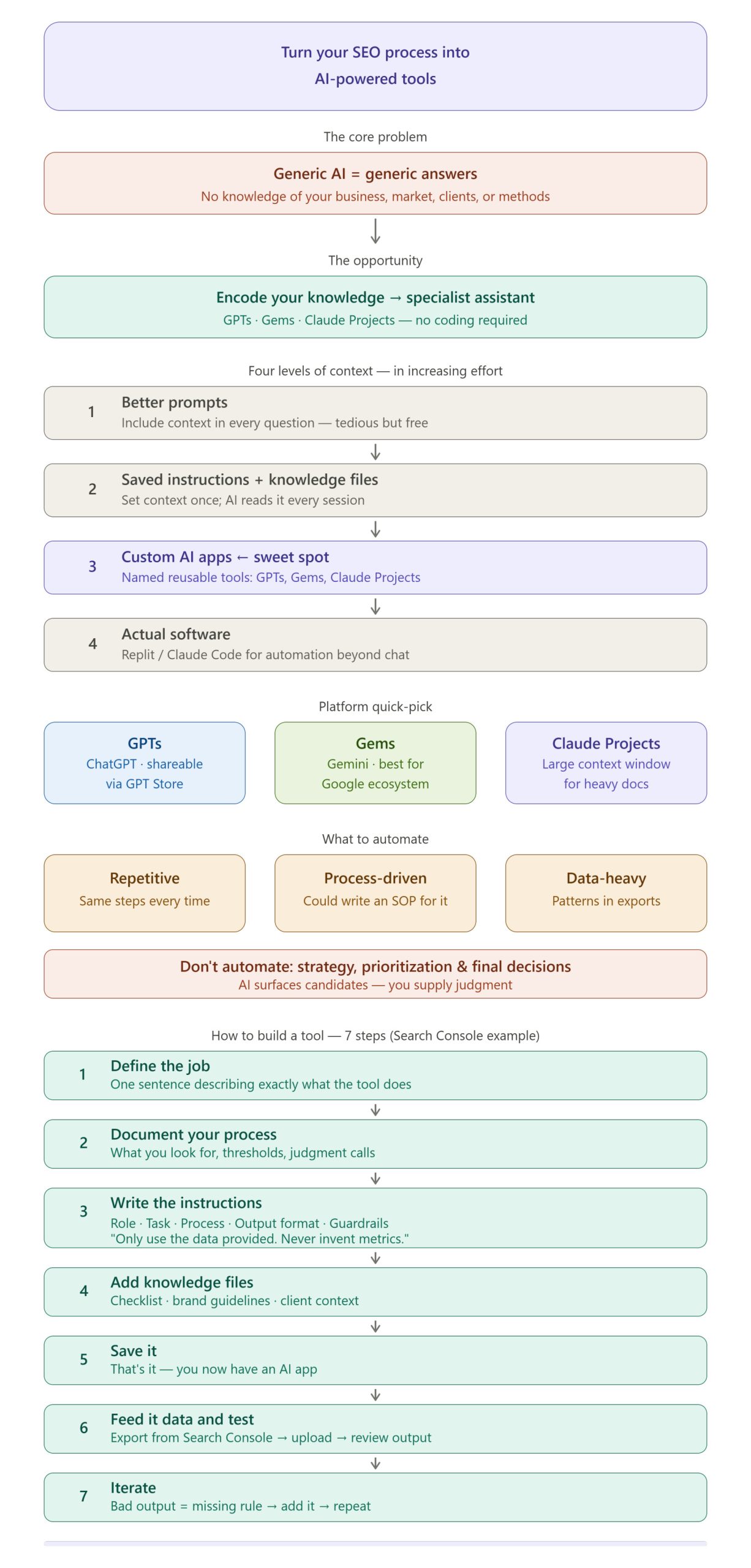
There are a few levels at which you can add that missing context, roughly ordered by the effort involved:
Richer prompts. Pack context directly into your question — who you are, what the business does, who the customer is, what success looks like. This works, but pasting a 500-word preamble into every session is tedious, and busy people skip it.
Saved instructions and knowledge files. Most AI platforms let you define standing instructions and upload reference documents. The model reads these automatically each session. You do the setup once; it persists.
Custom AI apps. Bundle those instructions and documents into a named, reusable tool with a clearly defined job. This is what GPTs, Gems, and Claude Projects are designed for.
Actual software. For tasks requiring real automation beyond a chat interface — processing massive data exports, running recurring scripts — use tools like Replit or Claude Code to build proper applications.
The leap from “big prompt” to “simple app” is much smaller than it sounds. If you can write a good brief for a junior team member, or document a standard operating procedure, you already have the skills to build one of these tools. This is increasingly a creative exercise, not a technical one.
A Tour of the Main Platforms
GPTs (ChatGPT): Custom ChatGPT versions with their own instructions and knowledge files. Shareable through the GPT Store if you want to publish tools for clients or your audience.
Gems (Gemini): Google’s equivalent. Particularly useful for SEOs already living in the Google ecosystem — Search Console, Analytics, Drive, and Sheets all within reach.
Claude Projects (Anthropic): Project-level instructions combined with a large context window, meaning it can hold substantial documentation in mind at once. Arguably the strongest option for knowledge-heavy work.
Replit: A browser-based platform where you describe an app in plain language and AI builds and deploys working software. The right tool when a chat interface simply isn’t enough.
Claude Code: An agentic coding tool that writes, runs, and debugs code based on plain-language instructions. Excellent for processing large data exports — the kind that would overflow a chat window entirely.
For most day-to-day SEO work, the first tier (GPTs, Gems, or Claude Projects) captures 80% of the value and can be set up in minutes.
Why Not Just Use Standard SEO Tools?
Traditional SEO software excels at what it was built for: crawling, rank tracking, backlink data. But it shares a structural weakness — it’s designed for every business in every industry, which means it can’t account for what actually matters in your situation. Everyone sees the same scores, the same severity ratings, the same generic recommendations.
Vanilla AI has the inverse problem: enormous capability, zero context.
Custom AI tools address both gaps by encoding what’s specific to you: your services and commercial goals, your competitors and customers, and critically, your process — the way you’ve learned to do the work over time. That last piece is where the real value lives. After years in this industry, the honest assessment is that the AI itself isn’t the differentiator. Your experience, encoded into it, is.
What’s Worth Automating?
A simple filter: automate tasks that are repetitive, process-driven, and data-heavy. If you do it the same way every time, could write instructions for a junior colleague to follow, and it involves staring at spreadsheets looking for patterns — it’s a good candidate.
Reviewing Search Console data fits all three criteria. So does first-pass on-page review, log file triage, internal link analysis, and reporting prep.
What stays with the human: strategy, prioritization against business objectives, and the final decision on what actually ships. The AI surfaces candidates and does the legwork. You supply the judgment.
Building It: A Search Console Quick-Wins Tool
Here’s a worked example using Gemini Gems, though the same steps transfer directly to GPTs and Claude Projects.
Step 1 — Define the job in one sentence.
“Review Google Search Console performance data and surface prioritized quick-win opportunities with a specific recommended action for each.”
Step 2 — Document your process.
What do you actually look for in Search Console? Write it out explicitly:
- Striking-distance queries: Ranking just off the first page (positions 5–15) with meaningful impressions. Small gains here have outsized impact.
- High impressions, low CTR: Visible but not earning the click — usually a title/meta issue, or a SERP feature is intercepting traffic.
- Declining queries and pages: Anything trending down versus the prior period.
- Query-page mismatches: Queries landing on the wrong page, or multiple pages competing for the same term.
- Unexpected rankings: Things you rank for by accident that hint at untapped content angles.
For each category, define your thresholds. What counts as “meaningful impressions” — 100? 500? What CTR is low for position 3 versus position 8? This is your judgment being made explicit, possibly for the first time.
Step 3 — Write the instructions.
Structure them around five elements: role, task, process, output format, and guardrails. Here’s an abbreviated version to adapt:
Role: You are a senior SEO analyst — methodical, skeptical of vanity metrics, focused on commercial impact.
Task: I’ll provide a Search Console performance export. Review it and identify quick-win opportunities.
Process: Check for, in this order: (1) Striking-distance queries — position 5–15 with 100+ impressions. (2) High-impression, low-CTR queries relative to expected rates for that position. (3) Pages or queries declining versus the comparison period. (4) Multiple pages competing for the same query.
Output: A prioritized table — opportunity type, query/page, current metrics, recommended action, expected impact (high/medium/low). Maximum 15 rows. Followed by a short plain-English summary of the three actions to tackle first.
Guardrails: Use only the data provided. Never invent queries, pages, or metrics. If something can’t be assessed from the data, say so.
That last section matters more than it might seem. “Only use the data provided” is your primary defense against the model confidently fabricating things.
Step 4 — Add knowledge files.
Upload supporting documents to deepen the tool’s context: your on-page optimization checklist, title and meta guidelines, a brief describing the client’s business and commercial priorities. This shifts the tool from surfacing any opportunity to surfacing relevant opportunities — a meaningful distinction when most sites rank for queries that don’t align with their core goals.
Step 5 — Save and test.
Export performance data from Search Console, open your new tool, upload the file, and run it. The first output probably won’t be perfect — that’s normal and actually useful. A bad recommendation tells you what was missing from the instructions. Add the missing rule and run it again. Treat it like onboarding a new analyst: review the work, correct it, refine the brief. After a few iterations you’ll have something that produces a genuinely useful first pass in seconds.
A Necessary Caution
Before you let this anywhere near client deliverables: AI is confidently wrong on a regular basis. Always verify recommendations against the underlying data before acting, and never let AI output reach a client without a human review pass.
Also worth considering: Search Console exports contain business data. Check the privacy and data handling settings of whatever platform you’re using, particularly with client accounts, and make sure your approach is consistent with any agreements you have in place.
The tool does the first pass. You do the thinking.
Other Tools Worth Building
Once the pattern clicks, it repeats easily. The same structure — role, task, process, output, guardrails, knowledge files — applies to almost any repeatable SEO task:
- A keyword research assistant that clusters by intent and maps to your site structure using your taxonomy and customer personas
- An on-page reviewer that checks content against your standards and suggests improvements in your preferred style
- A technical SEO triage tool that prioritizes crawl issues based on actual impact rather than default severity scores
- A link opportunity finder that identifies realistic prospects from competitor backlink data and drafts initial outreach angles
- A content strategist that generates briefs anchored to real customer problems rather than generic topic clusters
- An analytics reviewer that summarizes what changed, why, and what’s worth investigating — in plain English
Each of these is roughly an afternoon’s work. The limiting factor isn’t technical ability — it’s whether your process is documented clearly enough to hand over. If it isn’t, that’s the real work to do first.
The Actual Value Was Never the AI
Anyone can open Gemini or ChatGPT. That’s not a competitive advantage.
What can’t be easily replicated is your process — the checklists, thresholds, judgment calls, and hard-won instincts you’ve built up through years of doing the work. That’s what these tools allow you to encode and apply at scale.
Tools come and go. Documented knowledge compounds. Write yours down, build it in, and let the machine handle the tedious parts.